



Posts

Posts


Know when to redesign, how big the project is, what it costs and how long it takes. A 10-question diagnostic, a 12-week planning timeline and an SEO protection checklist.
By Jim Taylor. Updated November 2026.
Most redesigns start too late, after a leader sees a competitor, or too early, because of boredom. A simple trigger test removes the guesswork and makes the case easier to argue.
A careers website is a working system, not a poster. It earns its keep by turning visits into applications, and by making it easy for your team to keep the story current. The signs below fall into four groups: experience, operations, strategy and risk. Two or three strong signs in one group usually justify a project.
| Group | Sign | Quick test |
|---|---|---|
| Experience | Slow or awkward on a phone | Run a mobile speed test on your three busiest pages |
| Experience | Accessibility problems | Navigate by keyboard and run an automated check |
| Experience | Design no longer reflects your brand | Compare with your corporate and recruitment campaigns |
| Operations | Changes take weeks | Time the last five content changes |
| Operations | Languages and regions are painful | List markets that have no local content |
| Operations | Job feed or application problems | Count failed or duplicated jobs this quarter |
| Strategy | Rebrand, merger or new markets | Ask what changes in the next 12 months |
| Strategy | Application rate or search traffic falling | Compare six months with the same period last year |
| Risk | Supplier or product at end of life | Read the contract and the product roadmap |
| Risk | Costs rising faster than value | Compare three-year cost with the alternatives |
Use the diagnostic below. Ten questions give you a recommended scope, which you can take straight into a plan.
Ten quick questions. Your answers stay in your browser.
| If this is you | Likely scope |
|---|---|
| The foundations are sound, the content and design are tired | Refresh |
| The platform works, the design and structure hold you back | Rebuild |
| The platform or supplier is the constraint | Replatform |
This is the printable version. Switch on JavaScript to use the live calculator in your browser.
"Redesign" covers three very different projects. Naming the tier early prevents the most common failure: a refresh budget with a replatform ambition.
| Refresh | Rebuild | Replatform | |
|---|---|---|---|
| What changes | Content, imagery, stories, some templates | Templates, navigation, design system and content | Platform, templates and content |
| Typical trigger | Tired but sound | Structure and design hold you back | Platform or supplier is the constraint |
| Risk | Low | Medium | Highest: URLs, data and integrations |
| Effort | Weeks | Around 12 weeks (planning assumption) | 12 weeks or more (planning assumption) |
| SEO exposure | Low | Medium | High, needs a redirect plan |
| Best when | Results are fine but stale | The platform is fine, the website is not | You are fighting your system |
| Read next | Redesign checklist | Design best practices | Replace your provider |
If you are not sure whether the problem is the platform or the design, ask who can change what. If your own team cannot change things quickly, the platform is part of the problem, however good the design.
If the platform is the constraint, start with how to choose a careers website CMS and the careers website CMS page.
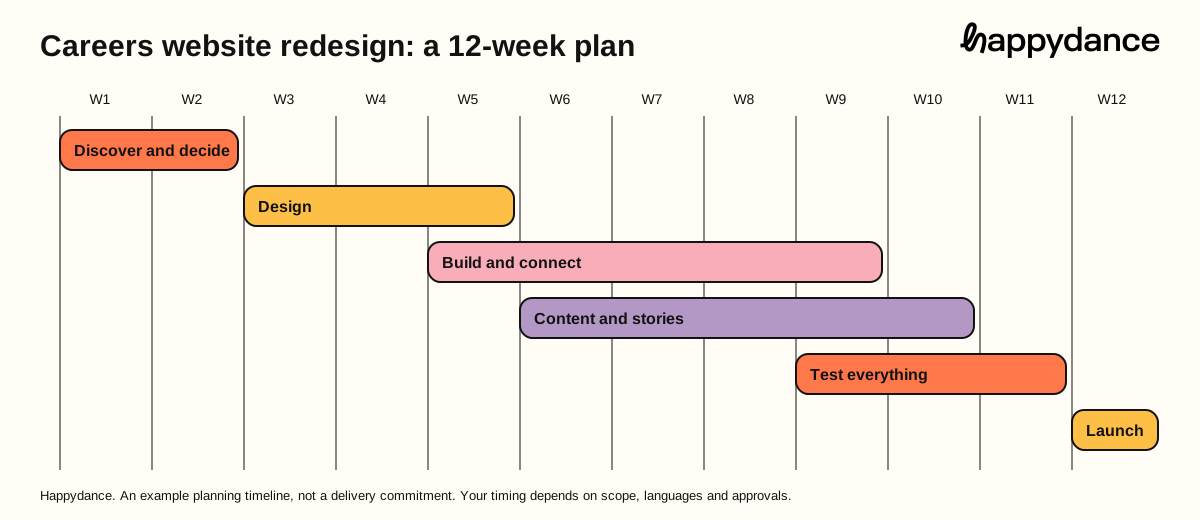
This guide uses twelve weeks as a planning assumption for a single-brand enterprise rebuild with a small number of languages. It is an example template, not a measured average and not a Happydance delivery commitment. More languages, brands or integrations add time. Content is the usual bottleneck, so start it in week 6, not week 10. Ask each supplier for a written plan against your scope.
Work Audit today: speed, accessibility, search, applications, content; Agree goals, the baseline and the single owner; Choose scope tier and platform route; Map every URL and every integration.
Result Signed-off brief and baseline report.
Work Candidate journeys and key templates; Design system: blocks, type, colour, imagery; Accessibility built into every component; Mobile first, then desktop.
Result Approved templates for each page type.
Work Build templates and global settings; Connect the job feed and the application route; Languages and regional variants; Draft redirect map and metadata.
Result Working website on a private address.
Work Write, translate and review in parallel with the build; Employee stories, photography and video; Calls to action and job alerts; Legal, privacy and consent text.
Result Approved content in every language.
Work Speed on real phones and slow networks; Accessibility audit and keyboard checks; Job feed, application and consent flows; Redirect testing and structured data checks.
Result Signed-off test report and go-live plan.
Work Switch live at a quiet time, with the team on hand; Submit sitemaps and check search console; Watch errors, redirects and applications daily; Report against the baseline at 30, 60 and 90 days.
Result Live website and a first results report.
You can download the planning timeline as a graphic for your project plan. For a full task list, our redesign checklist goes further.
Cost depends on tier, sites, languages, integrations and how much of the work your own team does. We explain the price drivers, the three routes and 15 hidden costs in how much a careers website costs. Happydance plans run from $20k per year up to $100k+, depending on plan, sites, languages and integrations. To estimate the return, use the ROI calculator.
A redesign can lose traffic you spent years earning, or keep it and grow. The difference is nearly always planning. Treat URLs and job data as assets, and use our migration checklist for the detailed steps.
Speed matters as much as structure. Our careers website performance leaderboard shows how large employers compare, and the fastest careers websites ranking gives you a target.
Redesigns slip when nobody owns decisions. Agree the roles before the first workshop and write them down.
| Area | Decides | Contributes | Signs off |
|---|---|---|---|
| Goals and baseline | Employer brand or TA lead | Analytics, finance | Sponsor |
| Design and brand | Employer brand | Marketing, design | Sponsor |
| Content and stories | Employer brand | HR, regional teams, employees | Employer brand |
| Jobs and ATS | Talent acquisition | IT, platform supplier | Talent acquisition |
| Legal, privacy and consent | Legal | Data protection | Legal |
| Accessibility | Employer brand | Design, supplier | Sponsor |
| Go-live | Project lead | Everyone | Sponsor |
After launch, keep a simple rhythm: a monthly review of results and a quarterly refresh of content and stories. Teams who can manage content themselves, without developers, keep that rhythm longest.
Set the baseline before you start, or you will never prove the result. Pick a small set and report it at 30, 60 and 90 days.
| Metric | Where to find it | Why it matters |
|---|---|---|
| Application rate (visits to applications) | Analytics and ATS | The headline result |
| Mobile speed and accessibility | Lighthouse and audits | The experience |
| Organic search visits to jobs | Search console | Protection and growth |
| Source mix and agency share | ATS and finance | The money |
| Time to publish a change | Your team | Operational freedom |
| Support requests and response time | Your supplier | Dependence |
For context on speed and accessibility, compare against the careers website performance leaderboard. For a wider employer brand measurement framework, the Happydance Academy has free resources, and our employer branding metrics post covers the rest.
Public benchmarks help you set realistic targets. On the Happydance leaderboard of 101 careers websites, Happydance customer websites score higher on average on mobile and desktop Lighthouse results.
Sample disclosure: 101 careers websites, of which 61 are Happydance customers, 38 are Fortune 100 companies and 2 are wild cards. Scores are Lighthouse results for mobile and desktop, out of 800. It compares customers with large-company careers websites, not the whole market. See the careers website performance leaderboard.
Most redesigns need budget. Use the business case template, with its one-page finance summary, and the ROI calculator to show a cautious, base and stretch return.
Customers manage everything themselves, including multilingual content, favicons and basic graphics, with no developer needed. Support is Standard (9 to 5, UK and Eastern time) or Elite (24/7), and every package includes a named customer success manager, a monthly check-in and a quarterly business review. Some customers report getting back up to 40 hours a month (customer-reported, not an average).
Happydance careers websites are live for brands including Ingram Micro, Criteo, Domino's, National Grid and General Motors. Read how they run theirs in our customer experiences.
For a deeper look at design choices, see careers website design best practices, and browse the best careers sites of 2026 for ideas.
A redesign without a baseline cannot prove it worked. Spend the first week recording where you are. Save the evidence in one shared folder so that results after launch are comparable.
| Area | What to record | Where to find it | Why it matters |
|---|---|---|---|
| Traffic | Visits by source, device and country | Your web analytics | Shows where candidates come from and which markets matter |
| Applications | Application starts and completions, by device | Analytics and ATS reports | The core outcome of the redesign |
| Speed | Lighthouse scores for your top ten pages, mobile and desktop | PageSpeed Insights | Gives a before and after you can show |
| Accessibility | Lighthouse accessibility score and a manual keyboard test | PageSpeed Insights, your own testing | Sets the standard the new site must beat |
| Search | Rankings for ten key terms, indexed pages, job pages in search | Search Console, rank checks | Prevents silent traffic loss |
| URLs | Every live address with its traffic and links | Crawl export | The input to your redirect map |
| Content | Every page, owner, language and last update | Content inventory | Decides what to keep, merge or remove |
| Brand | Employee stories, photography and claims you want to keep | Brand team | Protects what already works |
Refresh, rebuild or replatform. Match the tier to the problem, not the budget you hope for.
Who approves content, who edits and who owns the global brand.
Which launch first and which wait. Plan translation from day one.
ATS, analytics, consent and job feeds. List them early because they set the timeline.
Three numbers you will report at four, eight and twelve weeks.
Most redesign traffic loss is avoidable. It comes from changed addresses without redirects, removed pages that had links, and job pages that stop appearing in search. Treat search as a launch workstream with an owner.
Read the careers website SEO guide for the detail, and the Google for Jobs guide before you touch job page markup.
| Day | Activity | Owner |
|---|---|---|
| Monday | Final content freeze and redirect map sign-off | Project lead |
| Tuesday | Full test on phone, tablet and desktop; keyboard and screen reader check | Design and QA |
| Wednesday | Redirect and sitemap dry run on staging | SEO owner |
| Thursday | Go live in a quiet traffic window; smoke test every key journey | Developer or platform lead |
| Friday | Compare analytics and search data with the baseline; log issues | Project lead and analytics |
Teams often argue about scope from instinct. Score the same six questions instead. Give each a score from 0 (no) to 2 (yes, clearly), then add them up. This is a prompt for discussion, not a formula, so write down the reason for each score.
| Question | Score 0 to 2 | Points towards |
|---|---|---|
| Is the design on brand and the content current? | A low score points to a refresh | |
| Does the site fail on speed or accessibility on phones? | A high score points to a rebuild | |
| Can your own team change content without a developer? | A low score points to a replatform | |
| Do you need more languages or markets than today? | A high score points to a replatform | |
| Are job pages or applications blocked by the current structure? | A high score points to a rebuild or replatform | |
| Is the current contract ending within a year? | A high score makes a replatform cheaper to time |
Read the pattern, not the total. If the problem is mostly content and design, a refresh is enough. If it is speed, structure and who can edit, the platform is the problem and a new design on the same platform will not fix it. Take the answers into the cost guide to see what each tier involves, and the redesign checklist to plan the work.
A redesign is the only time you can clean the whole careers website at once. Use the content inventory to make a decision for every page. Moving everything unchanged preserves the old problems, and deleting without checking loses links.
| Decision | When to use it | Action | Redirect needed |
|---|---|---|---|
| Keep | Accurate, well-written and still wanted | Move across with light edits | Only if the address changes |
| Merge | Several thin pages cover one topic | Combine into one stronger page | Yes, from every old address |
| Rewrite | The topic is right but the copy is out of date or off brand | Rewrite with the new tone and facts | Only if the address changes |
| Retire | No traffic, no links, no purpose | Remove it | To the closest relevant page |
Give each page one owner and one decision, then review the list in one meeting with the sponsor. A short, reviewed list beats a long debate on every page.
Redesigns slow down when a late stakeholder objects. Brief each group early, in language they care about.
| Group | What they care about | When to involve them |
|---|---|---|
| Executive sponsor | Cost, risk and the outcome they will be asked about | Kick-off, scope sign-off and launch review |
| Recruiters and hiring managers | Whether job pages and applications get easier | Design review and a pre-launch walkthrough |
| Legal and privacy | Consent, data handling and claims | Before design is final, not the week of launch |
| IT and security | Integrations, hosting, access and single sign-on | Scoping, and again before integration testing |
| Regional and market leads | Language, local content and local rules | Scoping and a market-by-market launch plan |
| Employees who appear on the site | Their story, photo and consent | Before their content is published |
Launch is the start of the measurement period. Agree the review dates before go-live.
Do not change everything at once after launch. Change one thing, measure it, then move on. A site that is improved steadily beats one that is rebuilt every few years.
When the redesign is done, you will want to know how it compares. Across 101 large careers websites, only 5 reach a mobile performance score of 90 or more, and all 5 are Happydance customers. Of the 40 other sites, 27 score under 50 for mobile performance. Mobile accessibility of 90 or more is reached by 55 of the 61 customer sites and 23 of the 40 others. Use the sample as a benchmark, not a guarantee.
Read the full careers website performance leaderboard, then run your own pages through the careers website grader before and after.
Sample disclosure: 101 careers websites, of which 61 are Happydance customers, 38 are Fortune 100 companies and 2 are wild cards. Scores are Lighthouse results out of 100 per category. It compares customers with large-company careers websites, not the whole market.
When two or three strong signs appear in the same group: a slow or inaccessible experience, slow changes and painful languages, a rebrand or new markets, or a supplier or product at end of life. Use the diagnostic on this page to test it.
Use around 12 weeks as a planning assumption for an enterprise rebuild with a few languages, from decision to launch, then adjust it to your scope. It is an example template, not a measured average or a delivery commitment. More languages, brands and integrations add time, and content approvals are the most common delay.
It depends on the scope tier, the number of sites and languages, integrations and how much your team does itself. Compare three-year totals across routes. Our cost guide explains the drivers.
A refresh updates content and imagery in place. A rebuild changes templates, navigation and design on the current platform. A replatform moves to a new platform, with the highest risk to URLs and data.
Crawl first, keep URLs where possible, 301 redirect every change, keep job structured data valid, test in staging and monitor closely after launch. Our migration checklist has the full steps.
A single project lead, usually from employer brand or talent acquisition, with named owners for design, content, jobs and ATS, legal and sign-off.
Set a baseline for application rate, mobile speed and accessibility, organic visits to jobs, source mix and time to publish a change. Report at 30, 60 and 90 days.
Yes, on a platform that lets your team manage content, design blocks, languages and basic graphics themselves. That is one reason many teams choose a purpose-built careers website CMS. The free Happydance CMS Training Course shows what structured editor onboarding looks like, in 72 short lessons.
Scope sets the timeline. A refresh is shorter than a rebuild or a replatform. The 12-week timeline in this guide is a planning frame, not a promise.
Traffic, application starts and completions, Lighthouse scores, accessibility, search rankings, every live URL and a content inventory.
Map every old address to a new one with a 301 redirect, carry over titles and structured data, and monitor rankings daily after launch.
One project lead with named owners for content, design, search and integrations, and a sponsor who can decide.
Compare the same measures before and after at four, eight and twelve weeks, using the baseline you recorded.
Book a demo and we will help you choose a scope, a timeline and a plan that suits your team.
Book a demoSee the CMSPosts

Posts

Posts